Parkour Craft Adventure
Reviews
Parkour Craft offers a polished jumping experience with its colorful block worlds and straightforward star collection. The controls are responsive, and the increasing difficulty across worlds provides a good sense of progression. It is easy to replay levels to collect all stars, and the mobile-friendly design makes it convenient for short breaks. A clean, enjoyable game for casual players.
Description
Game Introduction
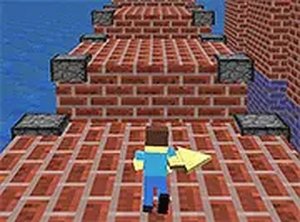
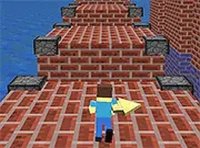
Parkour Craft is a delightful Minecraft-inspired voxel game that takes you on a colorful jumping adventure. In this safe and family-friendly online game, you guide a character through vibrant block worlds filled with platforms and obstacles. Your mission is to collect all three stars in each level and reach the portal to unlock the next world. With multiple worlds offering increasing difficulty, Parkour Craft provides hours of engaging gameplay. Best of all, you can play directly in your browser on any device without any downloads, making it perfect for quick gaming sessions anytime.
How to Play
Playing Parkour Craft is easy and intuitive. Use the arrow keys on your keyboard or the on-screen controls to move your character left and right. Press the jump button to leap between platforms and navigate the colorful levels. Your goal is to collect all three stars before reaching the portal to earn full points. Be careful not to fall into the water, as it ends the level and you will need to restart. Each new world introduces fresh challenges and layouts to explore, keeping the gameplay exciting and varied.
Game Features
Game features include voxel-style graphics that create a charming blocky world. Multiple worlds with unique themes and increasing difficulty keep the experience fresh. Star collection adds a rewarding goal to each level. Portal progression gives a clear sense of advancement. The game is mobile-friendly and supports full-screen mode for an immersive experience.
Tips for Success
To succeed in Parkour Craft, focus on timing your jumps carefully to avoid falling into water. Aim to collect all three stars in each level for maximum points. Take your time to study each platform layout before moving. Practice regularly to improve your reflexes and precision. If you get stuck, try different jump angles or approach routes. Remember that each world introduces new challenges, so stay adaptable and learn from each attempt.
Compatibility
Faq
Is Parkour Craft free to play?
Can I play Parkour Craft on my mobile phone?
Does Parkour Craft have different difficulty levels?
What happens if I fall into the water in Parkour Craft?
Are there any in-app purchases or ads in Parkour Craft?
Can I save my progress in Parkour Craft?
You May Also Like
Archer Adventure Arcade Game
Clean pixel art and smooth controls. A fun archery platformer for quick gaming sessions.
Fireblob Winter Platform Game
Charming pixel art and smooth controls. A warm, family-friendly platformer for quick fun.
Super Dassalo Land Adventure Game
Bright and cheerful platformer with simple controls and hidden treasures. Great for quick gaming sessions.
Troll Cat Adventure Arcade
Colorful and easy to play. The two-player mode adds nice variety. Great for quick breaks.
Green and Blue Adventure Duo
Clean cooperative gameplay with simple controls. Great for playing with a friend.
Sock Adventure Quest
A sweet, short adventure with easy controls and a charming story. Great for kids and casual players.
Museum Mystery Puzzle Adventure
A fun mystery puzzle game with hidden clues and a friendly night keeper. Great for all ages.
SpongeBob's Next Big Adventure Puzzle Game
Clean point-and-click puzzles with bright graphics. Great for young fans of the show.
Parkour Craft Adventure
Charming voxel design and smooth controls. Perfect for quick, relaxing play sessions.
Samurai Jump Adventure
Clean graphics and smooth controls. A relaxing jumping game that is easy to pick up and play.