
Notebook Quest Two-Player Platformer
Trusted instant play — no download required.
Reviews
Notebook Quest offers a unique twist on platformers by letting one player control the map. The notebook art style is charming, and the two-player dynamic encourages communication and strategy. It is free, easy to pick up, and perfect for short sessions with a friend. The game runs smoothly in a browser with no downloads needed.
About this game
Game Introduction
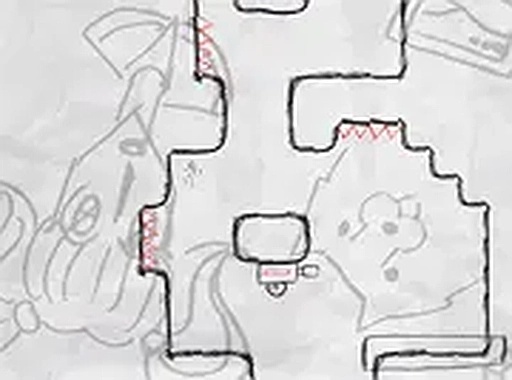
Notebook Quest is a two-player platformer that unfolds on the pages of a notebook. One player guides a stick figure character searching for hidden treasure, while the other player takes on the role of the map itself, drawing obstacles to slow progress. This creative twist offers a fun and engaging experience for friends. Designed for desktop play, it runs smoothly in a browser with a playful art style that brings the notebook world to life. The game emphasizes teamwork and strategy, making it perfect for quick sessions or longer play.
How to Play
Two players are required. One player uses the keyboard to move the stick figure character left, right, and jump across the map to reach the treasure. The other player uses the mouse to manipulate the map, drawing obstacles or changing terrain to hinder the character. The goal is for the character to find the treasure while the map controller tries to prevent it. The game is best played on a computer with a keyboard and mouse. No downloads are needed; just open a browser and start playing.
Game Features
Two-player cooperative and competitive gameplay. Notebook-themed art style with simple controls. Free to play with full screen support for desktop browsers. The game emphasizes teamwork and strategy, perfect for quick sessions or longer play.
Tips for Success
Communicate clearly with your partner to coordinate moves. For the character player, practice timing jumps to avoid obstacles. For the map controller, think ahead and place obstacles strategically to block the character's path. Experiment with different obstacle placements to find what works best. Take turns playing each role to understand both perspectives and improve overall strategy.


Player comments
Sign in to leave a review
You must be logged in before posting a rating or comment.
No account? Create one
No comments yet. Be the first to comment!