
GhostKid's Halloween Candy Quest Demo
Trusted instant play — no download required.
Reviews
GhostKid's Halloween Candy Quest Demo captures the magic of classic console platformers with its retro 3D graphics and catchy 90s soundtrack. The hand-crafted levels are thoughtfully designed, offering a good mix of exploration and light challenges. It's free, runs in a browser, and is suitable for all ages. A delightful Halloween treat for platformer fans.
About this game
Game Introduction
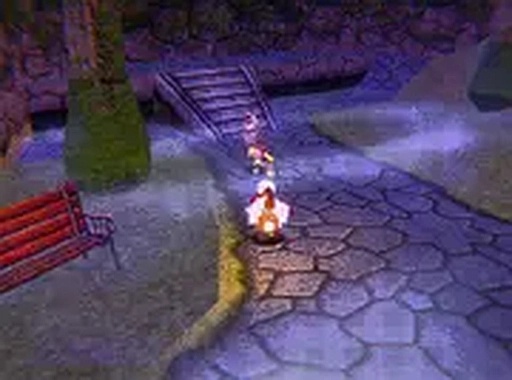
GhostKid's Halloween Candy Quest Demo is a 3D platform game set during a Halloween night adventure. Players control GhostKid, a character on a mission to find the legendary Ghoul Bar, a rare chocolate bar hidden within a haunted dimension. The demo offers a taste of the full adventure, featuring hand-crafted levels filled with various challenges. The game draws inspiration from classic console platformers, with retro-style graphics and a 90s-inspired soundtrack that creates a nostalgic atmosphere. This free-to-play browser demo allows anyone to experience the core gameplay without any downloads or installations.
How to Play
Players control GhostKid as he runs, jumps, and moves through 3D levels. The objective is to navigate past hazards and reach the end of each stage to find the Ghoul Bar. Hazards include slime pits, goblins, and pumpkins that shoot fireballs. The game is designed for desktop play using keyboard or mouse controls. A full-screen mode is available for a more immersive experience. Exploring every area of the hand-crafted world is encouraged, as hidden paths and collectible candy may be discovered along the way.
Game Features
The demo features retro-inspired 3D graphics that evoke the look and feel of classic console platformers. A 90s-style soundtrack complements the visual style, enhancing the nostalgic experience. Levels are hand-crafted, offering unique layouts and challenges. The platforming action is simple and accessible, suitable for players of all ages. The game is free to play directly in a web browser, with no downloads required. A full-screen mode is included for improved visibility and immersion.
Tips for Success
Take time to observe enemy movement patterns and level layouts before rushing in. Practice jumping and dodging to avoid hazards effectively. Collect candy whenever possible, as it may contribute to progression or scoring. Use full-screen mode for a clearer view of the environment. If a path seems blocked, consider exploring alternative routes or revisiting earlier areas for hidden secrets.



Player comments
Sign in to leave a review
You must be logged in before posting a rating or comment.
No account? Create one
No comments yet. Be the first to comment!