
Tower Ascend Reflex Game
Trusted instant play — no download required.
Reviews
Tower Ascend Reflex Game succeeds by keeping its core loop simple and satisfying. The gradual difficulty increase from wide, slow stairs to narrow, fast-moving ones creates a natural learning curve. Bonus targets add a welcome layer of strategy without overcomplicating the experience. The bright 3D visuals and responsive controls make it a solid choice for short breaks or longer sessions.
About this game
Core Climbing Mechanic
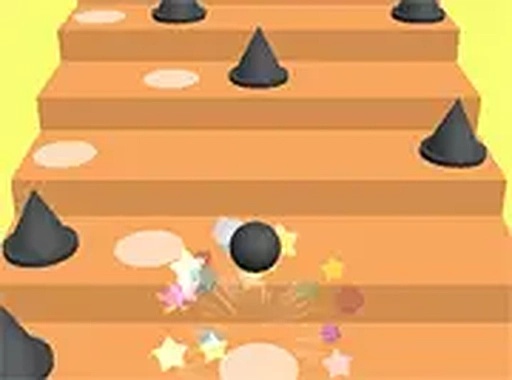
In Tower Ascend Reflex Game, the primary action revolves around timing each bounce to land squarely on the next stair. The staircase shifts and rearranges as you climb, requiring constant attention to the position of each step. A single mistimed bounce can send the ball off the edge, ending the run. This straightforward premise creates a loop that is easy to understand but demands increasing precision as the pace accelerates.
Obstacle and Bonus Integration
Certain steps feature red barriers that block the path. Landing on these triggers an immediate reset, so players must plan their trajectory to avoid them. Scattered across the climb are white circles that grant extra points when landed upon. These targets are often placed in slightly off-center positions, adding a risk-reward element to each bounce. Successfully hitting them requires careful adjustment of the ball's arc.
Visual Style and Atmosphere
The game uses a bright, three-dimensional visual palette that makes each stair distinct against the background. Colors shift as the player progresses, providing a clear sense of advancement. The clean, uncluttered design keeps focus on the ball and the steps, reducing visual noise. This approach supports long play sessions without causing eye strain, and the cheerful aesthetic fits a family-friendly audience.
Control Flexibility
Players can choose between mouse clicks or keyboard presses to trigger each bounce. This dual-input system accommodates different play styles and hardware setups. The controls are responsive, with no noticeable lag, which is critical for a game built on precise timing. A full-screen mode is also available, allowing for a more immersive experience on desktop computers.
Progression and Challenge Curve
The difficulty increases gradually as the player climbs higher. Early steps are wide and move slowly, giving newcomers time to learn the timing. Later stages introduce narrower steps and faster movement patterns, requiring quicker reactions and more careful planning. This curve ensures that the game remains accessible to beginners while still offering a satisfying challenge for experienced players aiming for high scores.





Player comments
Sign in to leave a review
You must be logged in before posting a rating or comment.
No account? Create one
No comments yet. Be the first to comment!