
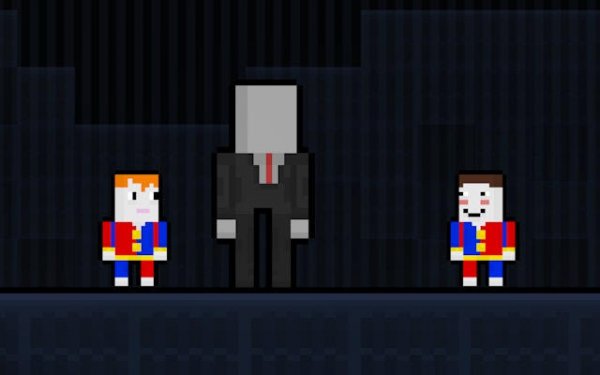
Woodland Gateway: Two-Player Quest
Trusted instant play — no download required.
Reviews
Woodland Gateway: Two-Player Quest delivers a refreshingly calm cooperative experience. The pixel-art forest is charming and detailed, with each area offering new hiding spots and visual variety. The roaming character adds just enough caution to keep things interesting without causing frustration. The coin-based costume system provides a satisfying sense of progression, and the controls are simple enough for young children to grasp quickly. Local multiplayer works seamlessly, encouraging real communication and teamwork. This is a well-crafted family game that prioritizes fun and accessibility over difficulty.
About this game
Core Objective
Players take control of a small character dropped into a dense pixel forest. The primary mission involves searching for a magical gateway that leads out of the woods. Scattered across the environment are shiny coins that can be picked up along the way. A tall, slow-moving figure patrols the trails, adding a light element of caution without creating intense pressure. The experience is designed to be calming rather than stressful, encouraging players to explore at their own speed.
Cooperative Dynamics
When playing with a partner, the forest becomes a shared space where communication matters. Each player can choose to explore separate sections of the map, using natural cover like thick bushes and large tree trunks to stay out of sight from the wandering character. This split approach allows for quicker coverage of the area, making it easier to spot the portal and collect more coins. The cooperative mode strengthens teamwork without requiring complex coordination, making it suitable for siblings, friends, or parent-child pairs.
Visual and Audio Style
The pixel-art presentation gives the woodland a nostalgic, retro feel. Trees, flowers, and pathways are rendered with careful detail, creating a visually pleasant environment that feels alive. The color palette leans toward earthy greens and warm browns, with occasional bright spots from collectible coins. Sound effects are minimal but effective, with soft rustling leaves and a subtle musical backdrop that shifts slightly when the roaming figure gets near. This audiovisual design supports the relaxed yet engaging tone of the game.
Reward and Customization System
Coins gathered during each run can be spent in a small in-game shop. The shop offers various costume options that change the appearance of the player character. These outfits are purely cosmetic, allowing players to personalize their experience without affecting gameplay. Unlocking new costumes provides a sense of progression and gives players a reason to revisit the forest multiple times. The system is straightforward, with no microtransactions or real-money purchases involved.
Accessibility and Control Scheme
Controls are designed to be intuitive for players of all ages. On desktop computers, movement is handled through keyboard arrows or WASD keys. Mobile devices use on-screen touch controls that respond smoothly to finger taps and swipes. The interface is clean and uncluttered, with clear visual indicators showing the roaming character's position. There is no time limit or score penalty, allowing players to take breaks or explore thoroughly without feeling rushed. This makes the game particularly welcoming for younger children or casual gamers.






Player comments
Sign in to leave a review
You must be logged in before posting a rating or comment.
No account? Create one
No comments yet. Be the first to comment!