
Eleven Eleven Block Puzzle
Trusted instant play — no download required.
Reviews
Eleven Eleven Block Puzzle offers a satisfying puzzle experience with its simple yet deep gameplay. The minimalist design and day/night mode make it comfortable to play anytime. It is easy to pick up but requires careful strategy to achieve high scores. Perfect for casual players who enjoy spatial puzzles.
About this game
Game Introduction
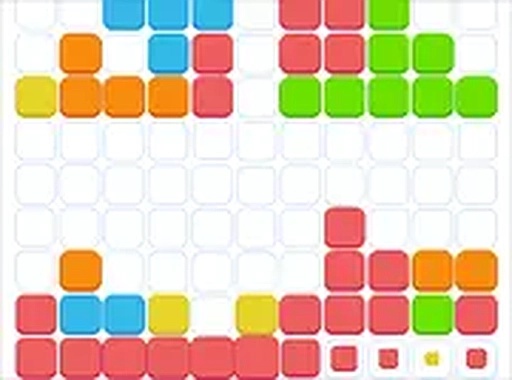
Eleven Eleven is a block puzzle game played on an 11x11 grid. The main goal is to place given shapes onto the board to fill entire horizontal or vertical lines. When a line is completed, it disappears, creating more space and awarding points. The game continues until no more shapes can be placed. Its simple rules hide a deep challenge that rewards careful planning. The clean, minimalist interface helps players focus on the puzzle. A day and night mode option allows comfortable play in any lighting. This game is free to play online and works well on both desktop and mobile browsers.
How to Play
To play Eleven Eleven, look at the shapes shown below the grid. Drag any shape onto the 11x11 board. Before placing, you can rotate or flip the shape to fit better. The goal is to fill entire rows or columns. Once a row or column is completely filled, it clears and you earn points. The game ends when there is no space left for any remaining shapes. Plan your moves to keep the grid open. The controls are intuitive and responsive. Full screen mode is available for a more immersive experience. Practice helps you recognize patterns and improve your score.
Game Features
Features include a minimalist design that reduces visual clutter. Day and night modes let you choose the best lighting. The game is easy to learn but becomes challenging as you progress. It is free to play online with no downloads needed. Works on desktop and mobile browsers. Full screen mode is available for focused play. The grid size stays the same, so each game is a fresh puzzle. As a classic arcade-style puzzle game, it offers endless replayability.
Tips for Success
To improve your score, try to keep the grid as open as possible by clearing lines regularly. Plan ahead where each shape will go before placing it. Use the rotate and flip options to fit shapes into tight spaces. Practice helps you recognize patterns and make quicker decisions. Taking short breaks can also help maintain focus and avoid mistakes.



Player comments
Sign in to leave a review
You must be logged in before posting a rating or comment.
No account? Create one
No comments yet. Be the first to comment!