Rhythm Blacksmith: Music Crafting Game
Reviews
Rhythm Blacksmith offers a fresh take on music games by combining rhythmic tapping with a charming fantasy workshop setting. The simple controls make it accessible for all ages, while the increasing difficulty keeps it engaging. The full-screen mode adds to the immersive experience, and the lack of downloads is a bonus. It is a relaxing yet challenging game that tests your timing and reflexes.
Description
Game Introduction
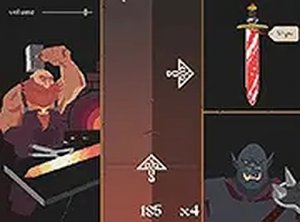
Rhythm Blacksmith is a music rhythm game that places you in the role of a dwarf blacksmith. Your goal is to craft items for travelers by hammering your anvil in perfect time with the music. The game combines rhythmic tapping with a fantasy workshop setting, creating a unique and engaging experience. As you progress, the rhythms become faster, testing your timing and reflexes. This game is designed for players of all ages and can be played directly in your browser on any device without downloads. The full-screen mode enhances immersion, making each session feel like a real blacksmithing adventure.
How to Play
To play Rhythm Blacksmith, follow the visual and audio cues on the screen. Tap or click in time with the music to hammer your anvil and craft items. Each successful beat brings you closer to completing an item, while missed beats may slow your progress. The controls are intuitive and work on both desktop and mobile devices. Focus on the rhythm, keep your timing sharp, and enjoy the satisfying sounds of metalworking. The game is easy to learn but offers increasing difficulty to keep you challenged.
Game Features
Music rhythm gameplay with a unique blacksmith theme. Simple tap or click controls suitable for all ages. Full-screen mode for an immersive experience. Progressive difficulty that tests your timing and reflexes. No downloads required, play directly in your browser on any device.
Tips for Success
Practice regularly to improve your sense of timing. Start with slower songs to build a solid foundation before tackling faster rhythms. Pay close attention to both visual and audio cues, as they work together to guide your actions. Stay relaxed and keep a steady rhythm; rushing often leads to missed beats. Enjoy the music and the crafting process, as a calm mind helps maintain accuracy.
Compatibility
Faq
What devices can I play Rhythm Blacksmith on?
Is there a cost to play Rhythm Blacksmith?
Can I play Rhythm Blacksmith offline?
How do I adjust the volume or sound settings in Rhythm Blacksmith?
Are there different songs or music tracks in Rhythm Blacksmith?
Does Rhythm Blacksmith save my progress if I close the browser?
You May Also Like

Bubble Pop 2: Classic Rebound
Bubble Pop 2: Classic Rebound is a fun, family-friendly bubble game with great 2-player mode and creative level editor.
Idle Card RPG Game
A fun idle RPG with card collection and strategic upgrades. Perfect for casual players who enjoy gradual progression.

Kogama Christmas Parkour 3D Arcade
A cheerful, family-friendly parkour game with festive visuals and simple controls. Great for short play sessions.

Precision Spotter 3D: Field Operative
Precision Spotter 3D offers realistic aiming and thermal vision, creating an engaging tactical experience for fans of precision gameplay.

Classroom Signal Challenge
A fun and family-friendly stealth game that sharpens your reflexes and observation skills in a classroom setting.

Sheep Tumble Arena 3D
A hilarious physics-based arena game where bouncy sheep create chaotic, family-friendly fun for all ages.

Superstars Pop It Bubble Puzzle
A calming bubble popping game with cheerful characters. Perfect for stress relief and quick fun.
Funball Puzzle - Arcade Puzzle
Funball Puzzle offers a clean, strategic arcade experience with simple controls and family-friendly content.

Bouncy Johnny Arcade Adventure
A simple, addictive jumping game with cheerful visuals and smooth controls. Great for quick breaks.

Princess Puzzle Escape Adventure
A charming puzzle adventure with cute graphics and simple controls that entertains players of all ages.